
Description
The Live Chat + AI Chatbot That Actually Knows Your Store
Most chatbots give generic answers. onWebChat plugs straight into your WooCommerce store, learns your entire product catalog automatically, and answers real order status questions with live data. The result: a chat widget that works like a trained sales and support agent, 24 hours a day, even while you sleep.
And if you don’t run a store? onWebChat is a full-featured live chat for any WordPress site: services, agencies, blogs, SaaS. Real-time visitor monitoring, chat triggers, mobile apps, the works.
🎁 Start Free: Sign up today and get a 1-month free trial of the Pro AI Plan plus 50 free AI bot credits. No credit card required. See all plans
🛒 Your Products, Synced Automatically

Enable product sync once, and your AI chatbot learns your whole catalog: names, descriptions, prices, stock status, brands, sizes, colors and other attributes.
- Zero maintenance: products sync the moment you add, edit or delete them
- Real-time stock sync: the AI never recommends something that’s out of stock
- Built for big stores: pick which categories to sync, up to 15,000 products
- Accurate answers with links: “Do you have this in blue?” gets a real answer and a direct link to the product page
No manual training. No copy-paste. No CSV uploads.
📦 “Where Is My Order?” Answered Instantly (New)
This is the feature your support inbox has been waiting for. When a shopper asks about their order, the AI chatbot replies in seconds with live WooCommerce data: current status, shipping method, and the order timeline with tracking updates.
Even better: signed-in customers don’t need to type an order number at all. The plugin securely confirms who they are, and the chatbot simply lists their recent orders and answers.
- Fewer repetitive “where is my package?” tickets for your team
- Instant, accurate answers for customers, at 3 PM or 3 AM
- Identity is verified securely before any order detail is shared
💬 Live Chat That Turns Visitors into Customers
The AI handles the routine questions. You close the sales.
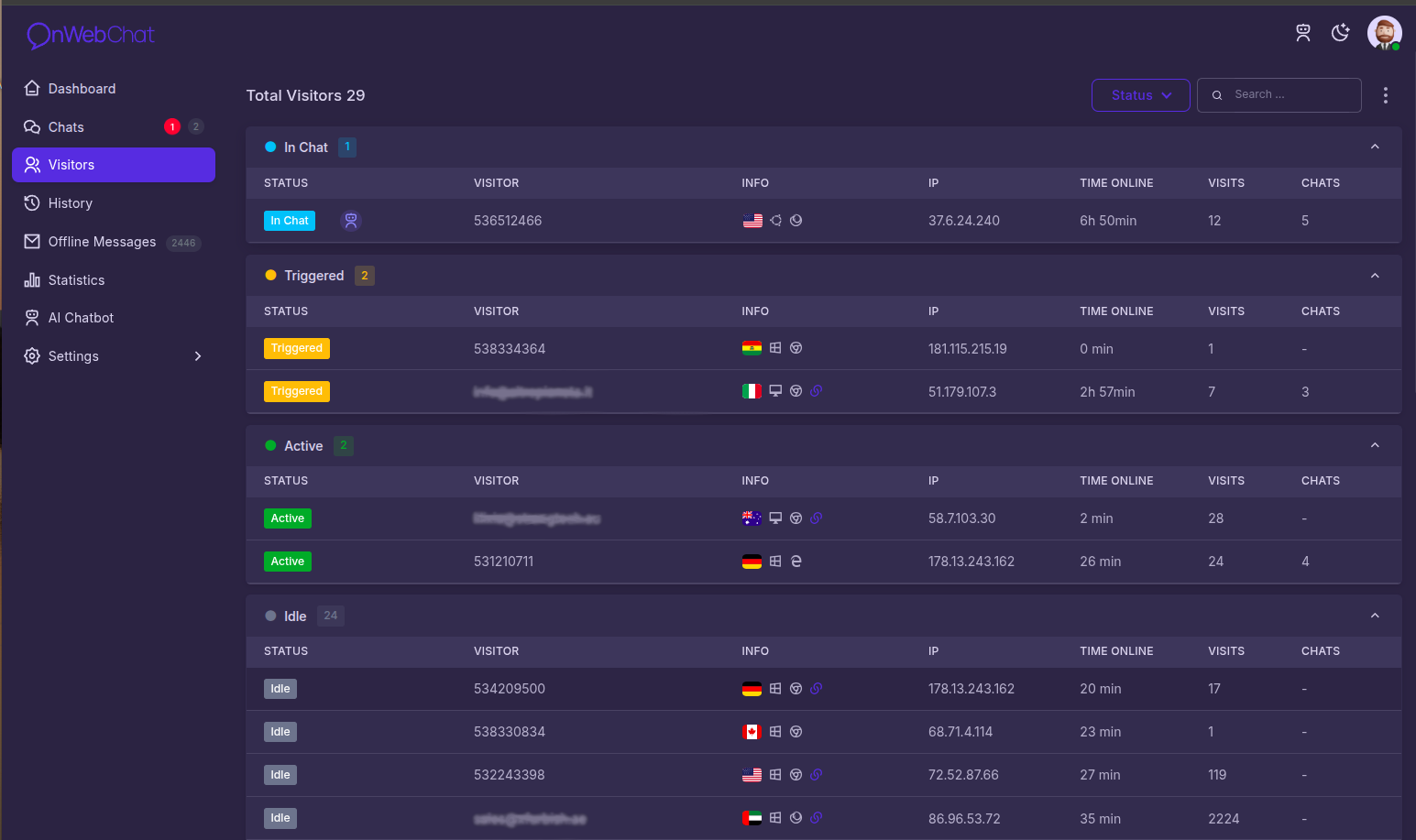
- Real-time visitor monitoring: see who is on your site, which page they are reading, and where they are from
- Chat triggers: automatically invite hesitating visitors to chat, at exactly the right moment
- Typing preview: see what visitors are typing before they hit send, and prepare your answer
- Mobile apps: answer chats from anywhere with the iOS and Android apps
Key Features
- AI Order Status Lookup: live WooCommerce order status, shipping method and history in chat. Signed-in shoppers need no order number.
- Automatic Product Sync: the AI learns your catalog (name, price, stock, brand, attributes) and stays current on every add, edit or delete.
- Category Sync for Large Catalogs: choose which categories to sync, up to 15,000 products.
- Real-Time Stock Sync: stock changes reach the AI immediately.
- AI Chatbot, 24/7: instant automated answers in any language, even with typos.
- Customizable Chat Widget: match your brand’s colors, text, and style.
- Live Visitor Monitoring: real-time activity tracking with geolocation.
- Chat Triggers: proactively start conversations based on visitor behavior.
- Department Routing: send chats to the right team or agent automatically.
- AI Text Correction: fix grammar and improve replies on the fly.
- Typing Preview: see visitor messages as they are typed.
- Chat Ratings: collect instant customer feedback after every chat.
- Agent Transfers: hand off live conversations between agents seamlessly.
- Offline Email Form: capture messages and leads when your team is away.
- Mobile Apps: iOS and Android apps for support on the go.
- Analytics & Reporting: track chat volume, response times, and satisfaction.
- File Sharing: exchange files with visitors right in the chat.
- GDPR Compliant: SSL-secured and privacy-ready.
What Your Customers Get
- Instant answers about products, stock and orders: no waiting, no frustration
- Live order tracking right inside the chat, day or night
- AI that understands their language, typos included
- A human agent one click away when they need one
Live in Under 60 Seconds
- Install the onWebChat plugin
- Create your free account
- Connect your account in the plugin settings
- Your chat widget is live, no coding required
Run WooCommerce? Flip on product sync in the settings and your AI chatbot knows your store within minutes.
Note: If you have trouble connecting via email/password (e.g. due to a firewall), you can use your Chat ID from the onWebChat Dashboard instead.
Questions? Chat with our team on onwebchat.com, we use onWebChat ourselves, of course.
Screenshots


Installation
1. Install the Plugin: Search for “onWebChat” in your WordPress plugin directory and activate. 2. Sign Up: Create a free account at onWebChat.com. 3. Connect: Enter your email and password (or Chat ID) in the plugin settings. 4. Go Live: Your chat widget appears on your site immediately, no setup wizard, no code. 5. (WooCommerce) Enable Product Sync: Turn on product sync in the onWebChat settings so the AI chatbot learns your catalog and can answer order status questions.
FAQ
-
Is onWebChat free?
-
Yes! No credit card is required. Our Free Plan includes almost all core features and is a great fit for most small businesses. New accounts also receive a 1-month free trial of the Pro AI Plan and 50 AI bot credits to test the full AI chatbot experience.
-
Can the chatbot answer “where is my order?”
-
Yes. With WooCommerce connected, the AI chatbot answers order status questions in real time using live order data: current status, shipping method and the order timeline. Signed-in customers do not even need to type an order number, the plugin securely confirms their identity and the chatbot lists their recent orders automatically. This cuts down on repetitive “where is my package?” support tickets.
-
How does the WooCommerce product sync work?
-
Enable automatic product sync in the onWebChat settings, and your AI chatbot learns your product catalog: names, descriptions, prices, stock, brands, attributes and links. Products sync automatically when added, updated, or deleted, and you can run a bulk sync for existing products at any time. Stores with large catalogs can choose which categories to sync, up to 15,000 products.
-
Do I need WooCommerce to use onWebChat?
-
No. onWebChat is a complete live chat and AI chatbot for any WordPress site. The product sync and order lookup features are a bonus for WooCommerce stores; everything else (live chat, AI chatbot with your own training data, visitor monitoring, triggers, mobile apps) works everywhere.
-
Is my store data safe?
-
Yes. All communication between your site and onWebChat is secured with HMAC-SHA256 authentication and a unique secret key, on top of SSL encryption. Product sync transmits only catalog data (name, description, URL, price, stock status, brand, attributes). Order details are never stored on our servers: they are fetched live, only when a customer asks, and only after the customer’s identity or order number has been verified.
-
How does the AI chatbot work?
-
You provide training data in the form of questions and answers, and WooCommerce stores can add their product catalog automatically via sync. The AI chatbot uses this knowledge to answer visitor questions instantly, in any language, even with spelling mistakes. You receive 50 free bot credits on signup to get started.
-
What does the Pro AI Plan include?
-
Everything in the Free Plan, plus: AI chatbot, AI tools, unlimited chat history, operating hours and white-label (remove the onWebChat branding).
-
How is the AI chatbot priced?
-
After your free 50 credits, AI chatbot access requires the Pro AI Plan. Bot credits start at $6 for 200 chat sessions, with volume discounts available.
-
Does the AI understand multiple languages?
-
Yes. The AI chatbot can understand and respond in your visitor’s language, regardless of the language your training data is written in. It also handles typos and informal phrasing naturally.
-
Can I show or hide the chat widget on specific pages?
-
Yes. You can control exactly which pages show the live chat widget from within the onWebChat plugin settings. You can also show the widget only to signed-in users.
-
Can I hide the chat widget when I’m offline?
-
Yes: simply deselect “Use Offline Form” in your dashboard to hide the widget when no agents are available.
-
Is there a white-label option?
-
Yes. The Pro AI Plan lets you remove the onWebChat logo from the chat widget.
-
Can I monitor visitor activity in real time?
-
Yes. The real-time monitoring dashboard shows who is on your site, their location, what pages they’ve visited, and more, so you can proactively start conversations at the right moment.
-
Can chats be transferred between agents?
-
Yes. Active conversations can be transferred to any available agent at any time.
-
Can I invite visitors to chat?
-
Yes. Use automated chat Triggers based on visitor behavior, or manually invite any visitor from the monitoring dashboard.
-
How secure is onWebChat?
-
All chat data is encrypted with SSL. Store integrations use HMAC-SHA256 authentication. onWebChat is fully GDPR compliant.
-
Which languages are supported in the dashboard?
-
The dashboard supports English, Swedish, German, French, Italian, Spanish, Portuguese, Slovenian, Greek, and Turkish. The chat widget text can be fully customized in any language.
-
I can’t connect with my email and password, what should I do?
-
If your connection is blocked (for example, by a firewall or server restriction), use your Chat ID instead. You can find it in the onWebChat Dashboard or in your registration email.
Reviews


Contributors & Developers
“Live Chat & AI Chatbot – onWebChat” is open source software. The following people have contributed to this plugin.
Contributors
“Live Chat & AI Chatbot – onWebChat” has been translated into 5 locales. Thank you to the translators for their contributions.
Translate “Live Chat & AI Chatbot – onWebChat” into your language.
Interested in development?
Browse the code, check out the SVN repository, or subscribe to the development log by RSS.
Changelog
3.8.2
- Improvement: more reliable WooCommerce product sync with paged syncing, clearer progress, and better error handling
3.8.1
- Improvement: category sync now supports up to 15,000 products
3.8.0
- New: Logged-in customers can securely ask the AI chatbot “Where is my order?” without entering an order number
- New: Order lookups now include the shipping method and order notes with tracking updates
- New: Added an option to display the chat widget only to logged-in users
3.7.2
- Improvement: increased synced product description limit to 1500 characters
- Fix: improved trimming for non-Latin descriptions
3.7.1
- New: Automatic order status lookup and WooCommerce sync upon account linking.
- New: Real-time product stock sync.
- Improvement: Clearer labels and instructions on connection screens.
3.7.0
- New: AI Order Status Lookup, your AI chatbot can now answer order status questions in real time using live WooCommerce data
- New: large catalogues (over 2,000 products) can now pick which product categories to sync, up to 9,000 products. New and edited products stay limited to the selected categories automatically
- Security improvements
3.6.0
- WooCommerce sync now always includes product price and currency (no longer optional)
- Sync now sends stock availability and quantity, brand, product attributes (size, colour, etc.), price ranges for variable products, tags and product rating, so the AI chatbot can answer pricing and availability questions
3.5.5
- Fixed WooCommerce sync connecting to the wrong server (development endpoint left enabled in 3.5.3/3.5.4)
- The plugin now reports its version to onWebChat when linked to an account
- Replaced deprecated WordPress functions and improved escaping of user data in the chat widget code
3.5.4
- Declared compatibility with WordPress 7.0
3.5.3
- Updated plugin images
3.5.2
- Minor bug fixes
3.5.1
- Minor bug fixes
3.5.0
- NEW: WooCommerce Product Sync, automatically sync products for AI chatbot training
- NEW: Bulk product sync with background processing
- NEW: Real-time product updates on create, edit, and delete
- NEW: Admin UI for WooCommerce integration settings
- Improved AI chatbot with product knowledge capabilities
3.4.1
- Tested on WordPress 6.8; updated plugin texts
3.4.0
- Bug fixes and security improvements
3.3.2
- Bug fix
3.3.1
- AI chatbot support and bug fix
3.3.0
- AI chatbot support added
3.2.0
- Security bug fix
3.1.0
- JavaScript API commands support
3.0.4
- Bug fix
3.0.3
- Bug fix
3.0.2
- Show/hide chat widget on selected pages, bug fix
3.0.1
- Added ability to show/hide live chat widget on selected pages
2.0.2
- Support for new Chat ID format
2.0.0
- Login by email/password or Chat ID
- Option to show/hide live chat widget
1.0
- Initial release